Initial surprises and quick wins
Switching the first tests to run on EngFlow was completely seamless: All it took was EngFlow providing a Remote Execution endpoint, and Selenium making a small configuration change for the first tests to be running remotely. The browser-based tests took a bit more effort, even with Bazel already managing browser and driver versions, because they required the ability to choose the Docker image the build actions were executed on – but with EngFlow’s help this was also straightened out.
When running the entire Chrome test suite on EngFlow for the first time, many tests were immediately green out-of-the-box and completed 5x faster, which was a good place to be starting from. Running all the linters, which could take over 1 hour in GitHub, took just 5 minutes on EngFlow – that’s a 12x speed-up!
{ Faster, Simpler } — Choose two
EngFlow doesn’t just make builds and tests faster, it also lets you simplify them.
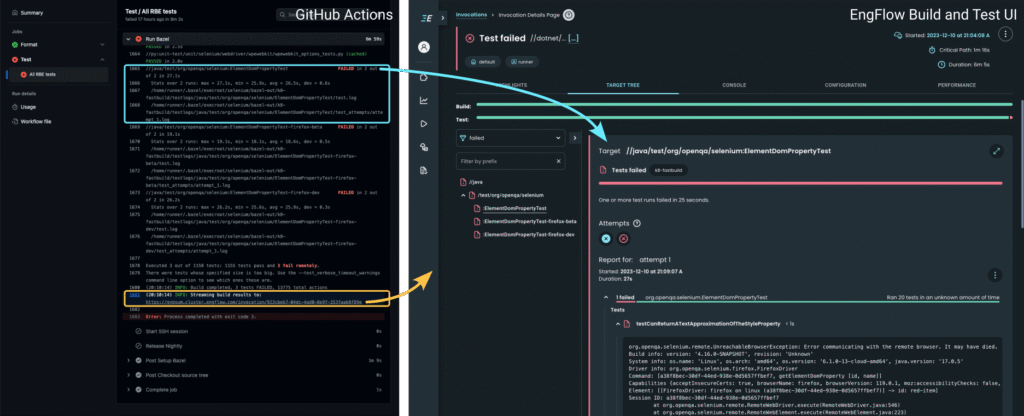
You can see this for yourself in EngFlow’s Selenium Build and Test UI:
Left: GitHub Actions page with link to EngFlow Build and Test UI
Right: EngFlow Build and Test UI, showing a richer and more actionable view of a Bazel test failure
For failed tests, developers get a nicely rendered view of which test cases failed and why, as well as everything they need to dig in. For example, in the figure above, the terminal output on the left prints out that a target failed and includes the path to a log file containing more details. In EngFlow’s UI, the failure reason is shown inline, as well as a summary of which of the 20 test cases failed.
EngFlow also helps you simplify complex, expensive and error-prone platform-specific setups. Builds and tests specify how each individual action was configured and run, which can be analyzed to fix problems and improve their performance.